General NewsGenerate Zero achieves ISO/IEC 27001 certification
Read moreGenerate Zero is now ISO 27001:2022 certified, confirming an independently audited approach to protecting customer data.


November 9, 2026
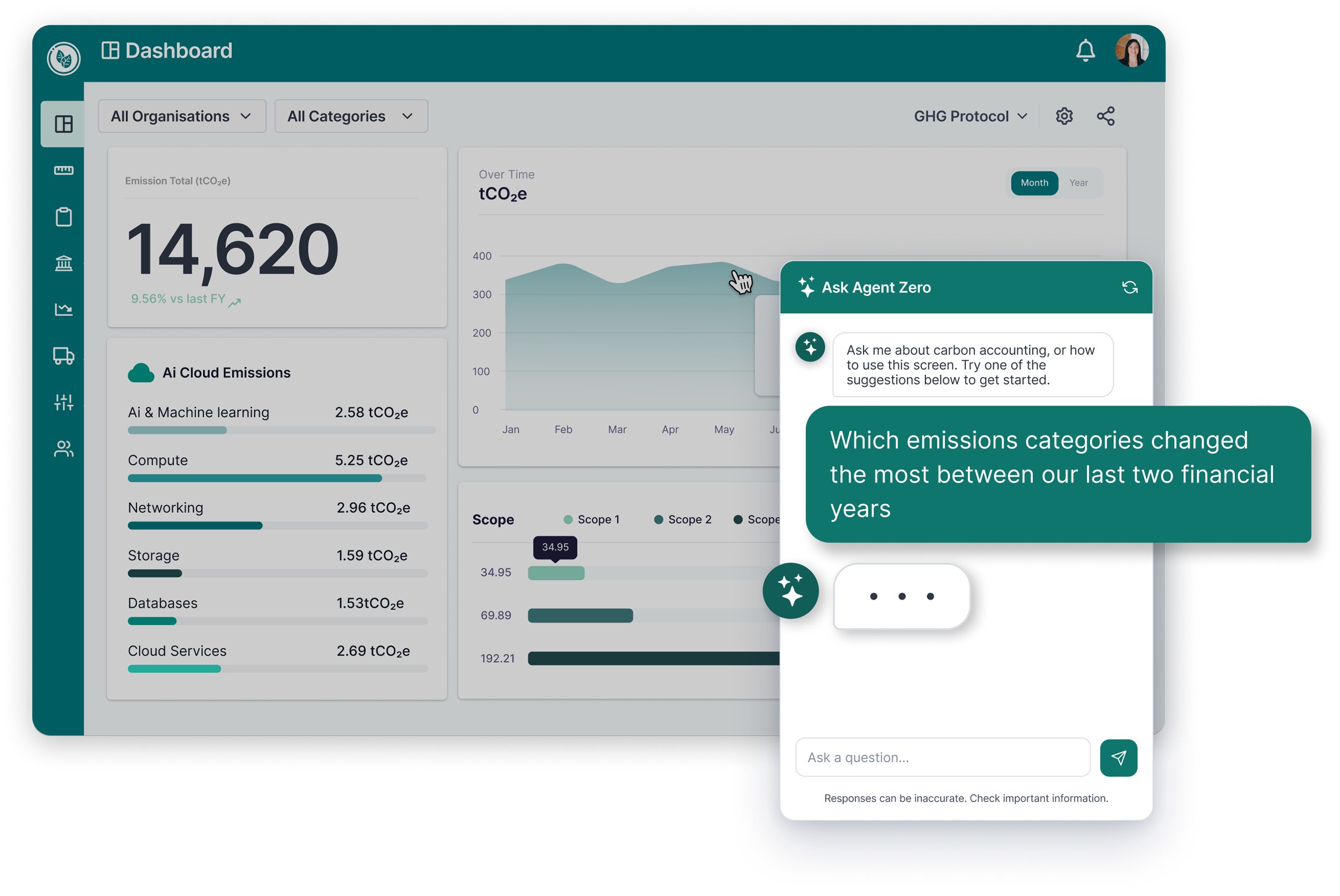

“Why have these emissions changed?”
It’s a straightforward question. Answering it can take a little more digging.
You might need to compare reporting years, check the activity data behind a calculation or work out whether the same sources were included in both periods.
Customers have been bringing questions like this to Agent Zero, our new AI assistant inside the Generate Zero platform. It lets them explore their organisation’s data and get help using the platform by asking questions in plain language.
Within its first seven days, more than 40% of customer organisations had already switched it on.
We’ve brought together five examples based on early customer conversations and questions our support team regularly hears. Here’s where to start, what to ask next and how the answers can help with your reporting work.
Example questions have been adapted and identifying details removed. Follow-up prompts are suggestions to help you explore further. Answers depend on the data and functionality available in your organisation’s account.
Your annual total tells you whether reported emissions have gone up or down. To understand the difference, you need to look at what’s happened underneath it.
Customers have been asking Agent Zero to compare reporting years and highlight the categories with the biggest changes.
Start with:
“Which emissions categories changed the most between our last two financial years?”
In one early example, Agent Zero showed the category figures for each year, highlighted increases and decreases, and identified a category that only appeared in the later period.
That last detail matters. A source being reported for the first time needs a different explanation from an increase in an activity you’ve tracked for years.
Then ask:
“Are there any categories with data in one year but not the other?”
This helps you check whether the comparison covers the same sources before investigating what caused the changes.
When someone asks how you arrived at a figure, the emission factor is only part of the answer.
You also need to understand the activity data used, how it was converted into emissions and what records support the calculation. These are recurring questions for our support team.
Start with:
“What activity data and emission factors were used to calculate our purchased electricity emissions?”
Then ask:
“What supporting records or calculation details are available for that figure?”
Looking at the activity data alongside the factor helps you understand what’s behind the result. It also helps when comparing years: a change in reported emissions could reflect different activity, an updated factor or both.
In one early customer conversation, a year-on-year comparison led to questions about the factors used for electricity and working from home. Checking the factors added context to the changes in the reported figures.
Check which records and periods the answer covers. You may need to open the supporting details in the platform to complete your review.
Before finishing a report, you need to know whether you’re still waiting on information.
Perhaps a supplier had records last year but none this year. A site might have data for most months, with a gap in the middle. Those are useful things to investigate before treating the report as complete.
Start with:
“Which suppliers or sites have data for the previous financial year but none for the current year?”
Then ask:
“Are there any months with no data for those sites?”
Comparing coverage can help you work out where to follow up. But a gap doesn’t automatically mean something has been missed. A site may have closed, a supplier may no longer be used, or the data may not yet be due.
Use the answer to build a list of checks, then confirm what you still expect to receive. This is particularly useful when several people or sites contribute to the same report.
You open a dashboard expecting to see business travel emissions, but can’t find them.
Is the data missing? Are you looking at the right period? Is a filter affecting the view?
Customers have been asking Agent Zero to help work through this too.
Start with:
“Why can’t I see business travel emissions for our current financial year?”
In one example, Agent Zero found that business travel data was available for the requested period. It then suggested checking the reporting period, facility filters and relevant dashboard tabs, with a link to the dashboard guidance.
Then ask:
“Where can I find guidance on the dashboard filters?”
Checking whether the records exist can save you from chasing data that’s already been entered. You can then focus on how to display it.
Sometimes the question is much simpler: can I copy these rows, or do I need to enter them again?
One customer asked exactly that while making a manual entry. Agent Zero explained the spreadsheet-style functionality available and linked to the relevant release notes.
Start with:
“When adding data manually, can I copy and paste multiple rows?”
Then ask:
“Where can I find the guide to manual data entry?”
Agent Zero is connected to the Generate Zero knowledge base, so you can ask about platform functionality alongside questions about your emissions data.
A quick answer can help you get on with the task without having to search for the right help article first.
The question you start with doesn’t have to cover everything you want to know.
You might begin with a comparison between years, then check the activity data and emission factors behind a change. Or ask about a figure you can’t see and discover that you need to adjust a dashboard filter.
Read the answer, check which period and data it covers, and follow up on anything you want to understand better. If it only includes part of the data, use the full breakdown in the platform before drawing conclusions.
Agent Zero works within your organisation’s Generate Zero environment and is also connected to our knowledge base. It doesn’t search the open web, and each conversation starts fresh without access to previous chats.
Perhaps there’s a change you need to explain, or a question that comes up every reporting year.
Bring it to a demo. We’ll use example data to show you how Agent Zero works inside Generate Zero and explore how you could use it in your team’s reporting work.
Book an Agent Zero demo →
If you haven’t enabled Agent Zero yet, go to Organisation Settings → New Features to switch it on.
If you’d like some guidance, our team would be happy to walk you through it. We can try questions relevant to your work and show you how to explore the answers in more detail.

Generate Zero is now ISO 27001:2022 certified, confirming an independently audited approach to protecting customer data.

The Ministry of Social Development has joined Generate Zero to measure, report and reduce its operational emissions.

Buying from a local supplier does not tell you the whole story. A laptop example explains how upstream modelling can help prioritise modern slavery du